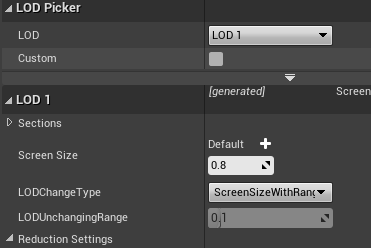
UE的Mesh关于LOD的切换是用的屏占比ScreenSize,一般是美术设置几个屏占比的参数,本地看着差不多就行了。
下面研究下这个屏占比在引擎里是怎么运作的,方便理解和优化功能。
1. Q:这个ScreenSize是怎么生效的? A:ScreenSize先转换为距离,后续以距离的形式剔除和选择LOD。
2. Q:ScreenSize是如何转换成距离的? A:通过下面这个方法,把LOD的各个级别的ScreenSize转换为Distance,保存在LOD信息里。
转换比例由投影矩阵共同决定,不能仅按屏幕宽高比列出固定半径倍数。下面保留原分支计算函数,并在后文给出带 FOV 条件的示例。
1 2 3 4 5 6 7 8 9 10 11 12 13 float ComputeBoundsDrawDistance(const float ScreenSize, const float SphereRadius, const FMatrix& ProjMatrix) { // Get projection multiple accounting for view scaling. //取投影矩阵横纵缩放中的较大值;不是直接读取屏幕宽高比 //投影缩放还取决于 FOV;16:9 本身不足以确定矩阵元素 const float ScreenMultiple = FMath::Max(0.5f * ProjMatrix.M[0][0], 0.5f * ProjMatrix.M[1][1]); // ScreenSize * 0.5f const float ScreenRadius = FMath::Max(SMALL_NUMBER, ScreenSize * 0.5f); //计算距离 return (ScreenMultiple * SphereRadius) / ScreenRadius; }
3. HISM的LOD选择过程 在FHierarchicalStaticMeshSceneProxy::GetDynamicMeshElements里,渲染线程里用来收集当前HISM的MeshElement。 里面通过Cluster结构进行HISM的 视锥剔除、遮挡剔除、距离剔除、LOD选择。
核心方法是在FHierarchicalStaticMeshSceneProxy::Traverse()里
1 2 3 4 5 6 7 8 9 10 11 12 13 14 15 16 17 18 FHierarchicalStaticMeshSceneProxy::Traverse() { //视锥剔除ViewFrustum Cull //距离剔除(这里距离剔除是用LOD组的最远一级的距离进行剔除) //Cluster的包围盒中心到摄像机的距离 与每一级LOD的距离进行对比,得到最小LOD和最大LOD。 CalcLOD(MinLOD, MaxLOD, BoundMin, BoundMax, ViewOriginInLocalZero, ViewOriginInLocalOne, LODPlanesMin, LODPlaneMax); //遮挡剔除 //是否可以把当前ClusterNode直接用一个LOD级别渲染 //如果一个LODGroup就会return了,如果不能一个,继续往下面级别的ClusterNode遍历 //只要不被剔除掉,这里就会设置当前Instance使用什么LOD级别渲染 //因为涉及到LODDither切换的情况,这里会传进去两个LOD级别 Params.AddRun(MinLOD, MaxLOD, Node.FirstInstance, Node.LastInstance); //继续往下递归Traverse() }
原笔记配图:旧版 HISM LOD 的 Screen Size 和范围设置。
4. DitherLOD Transition 当材质开启DitherLODTransition开关之后,会有渐变的lod切换。
在ShaderBind过程中,Alpha是获取一个LODTransition值,这个值是通过一个公式计算:
(真实上一帧时间 - DelayTime - 保存的上上帧时间) / (保存的上一帧时间 - 保存的上上帧时间)
1 2 3 4 5 6 7 8 float GetTemporalLODTransition(float LastRenderTime) const { if (TemporalLODLag == 0.0) { return 0.0f; // no fade } return FMath::Clamp((LastRenderTime - TemporalLODLag - TemporalLODTime[0]) / (TemporalLODTime[1] - TemporalLODTime[0]), 0.0f, 1.0f); }
DelayTime就是切换的时间,在引擎的另一个地方,当帧间隔大于DelayTime,才会去保存TemporalLODTime。
LODTransition的值就会慢慢变大,到DelayTime的时候就到达1。
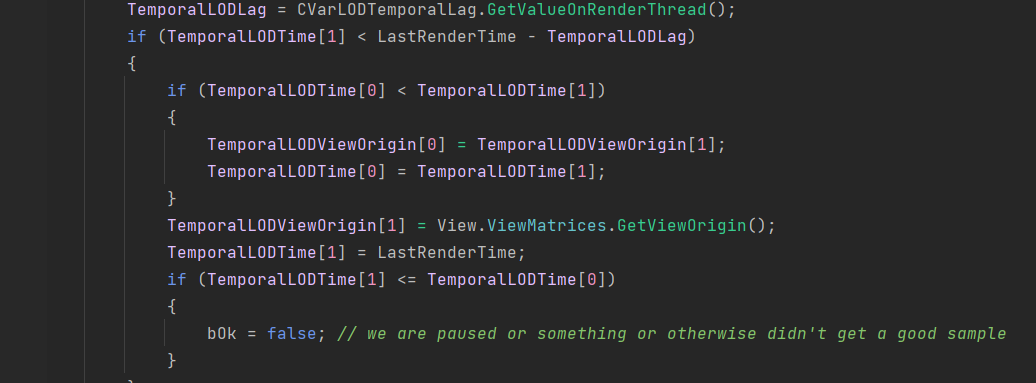
1 2 3 4 5 6 7 8 9 10 11 12 13 14 15 16 17 18 19 if (!View.bDisableDistanceBasedFadeTransitions) { bOk = true; TemporalLODLag = CVarLODTemporalLag.GetValueOnRenderThread(); if (TemporalLODTime[1] < LastRenderTime - TemporalLODLag) { if (TemporalLODTime[0] < TemporalLODTime[1]) { TemporalLODViewOrigin[0] = TemporalLODViewOrigin[1]; TemporalLODTime[0] = TemporalLODTime[1]; } TemporalLODViewOrigin[1] = View.ViewMatrices.GetViewOrigin(); TemporalLODTime[1] = LastRenderTime; if (TemporalLODTime[1] <= TemporalLODTime[0]) { bOk = false; // we are paused or something or otherwise didn't get a good sample } } }
把两个AlphaCutOff的值传给Shader:
InstancingWorldViewOriginOne.W,
InstancingWorldViewOriginZero.W
然后还有一个InstancingViewZCompareZero和InstancingViewZCompareOne,通过两次循环分别设置两层(或者两帧)的对比距离。
1 2 3 4 5 6 7 8 9 10 11 12 13 14 15 16 17 18 19 20 21 22 23 24 25 26 27 28 29 30 31 32 33 34 35 36 37 38 39 40 41 42 43 44 45 46 47 48 49 50 51 52 53 54 for (int32 SampleIndex = 0; SampleIndex < 2; SampleIndex++) { FVector4& InstancingViewZCompare(SampleIndex ? InstancingViewZCompareOne : InstancingViewZCompareZero); float FinalCull = MAX_flt; if (MinSize > 0.0) { FinalCull = ComputeBoundsDrawDistance(MinSize, SphereRadius, View->ViewMatrices.GetProjectionMatrix()) * LODScale; } if (InstancingUserData->EndCullDistance > 0.0f) { FinalCull = FMath::Min(FinalCull, InstancingUserData->EndCullDistance * MaxDrawDistanceScale); } FinalCull *= MaxDrawDistanceScale; InstancingViewZCompare.Z = FinalCull; if (int(BatchElement.InstancedLODIndex) < InstancingUserData->MeshRenderData->LODResources.Num() - 1) { float NextCut = ComputeBoundsDrawDistance(InstancingUserData->MeshRenderData->ScreenSize[BatchElement.InstancedLODIndex + 1].GetValue(), SphereRadius, View->ViewMatrices.GetProjectionMatrix()) * LODScale; InstancingViewZCompare.Z = FMath::Min(NextCut, FinalCull); } InstancingViewZCompare.X = MIN_flt; if (int(BatchElement.InstancedLODIndex) > FirstLOD) { float CurCut = ComputeBoundsDrawDistance(InstancingUserData->MeshRenderData->ScreenSize[BatchElement.InstancedLODIndex].GetValue(), SphereRadius, View->ViewMatrices.GetProjectionMatrix()) * LODScale; if (CurCut < FinalCull) { InstancingViewZCompare.Y = CurCut; } else { // this LOD is completely removed by one of the other two factors InstancingViewZCompare.Y = MIN_flt; InstancingViewZCompare.Z = MIN_flt; } } else { // this is the first LOD, so we don't have a fade-in region InstancingViewZCompare.Y = MIN_flt; } } InstancingOffset = InstancingUserData->InstancingOffset; InstancingWorldViewOriginZero = View->GetTemporalLODOrigin(0); InstancingWorldViewOriginOne = View->GetTemporalLODOrigin(1); float Alpha = View->GetTemporalLODTransition(); InstancingWorldViewOriginZero.W = 1.0f - Alpha; InstancingWorldViewOriginOne.W = Alpha; InstancingViewZCompareZero.W = LODRandom; }
在Shader里:
Intermediates.PerInstanceParams.w会在后续PS里作为CutOff值进行像素丢弃。
1 2 3 4 5 6 7 8 9 10 11 12 13 14 15 16 Intermediates.PerInstanceParams.x = GetInstanceRandom(Intermediates); float3 InstanceLocation = TransformLocalToWorld(GetInstanceOrigin(Intermediates), Intermediates.PrimitiveId).xyz; Intermediates.PerInstanceParams.y = 1.0 - saturate((length(InstanceLocation + ResolvedView.PreViewTranslation.xyz) - InstancingFadeOutParams.x) * InstancingFadeOutParams.y); // InstancingFadeOutParams.z,w are RenderSelected and RenderDeselected respectively. Intermediates.PerInstanceParams.z = InstancingFadeOutParams.z * SelectedValue + InstancingFadeOutParams.w * (1-SelectedValue); #if USE_DITHERED_LOD_TRANSITION float RandomLOD = InstancingViewZCompareZero.w * Intermediates.PerInstanceParams.x; float ViewZZero = length(InstanceLocation - InstancingWorldViewOriginZero.xyz) + RandomLOD; float ViewZOne = length(InstanceLocation - InstancingWorldViewOriginOne.xyz) + RandomLOD; Intermediates.PerInstanceParams.w = dot(float3(ViewZZero.xxx > InstancingViewZCompareZero.xyz), InstancingViewZConstant.xyz) * InstancingWorldViewOriginZero.w + dot(float3(ViewZOne.xxx > InstancingViewZCompareOne.xyz), InstancingViewZConstant.xyz) * InstancingWorldViewOriginOne.w; Intermediates.PerInstanceParams.z *= abs(Intermediates.PerInstanceParams.w) < .999; #else Intermediates.PerInstanceParams.w = 0; #endif
原笔记配图:原分支中时间平滑 LOD 状态更新代码的截图,避免把瞬时距离直接作为全部过渡状态。
5. ScreenSize 距离公式的适用条件 上文列出的“半径若干倍”只对对应投影矩阵取值成立,不能仅凭屏幕是方形或 16:9 推出。由示例代码可得:Distance = max(P00,P11) * SphereRadius / ScreenSize,其中投影项包含 FOV 和宽高比约定。
若固定竖直 FOV 为 90°,则 P11=1;在常见横屏透视约定中,宽高比 16:9 时 P00=9/16,此时 ScreenSize=0.5 对应距离为两倍半径,并非固定 3.56 倍。应以目标 UE 分支实际投影矩阵为准。
Dither 过渡表达覆盖率,并不自动保持几何、法线、高光和阴影连续。切换期间同时渲染多个 LOD 也会增加几何与 Mask 工作,需结合时域方案和性能观察。
总结 ScreenSize 通过投影参数转成距离范围,Cluster 遍历组织实例 LOD,Dither 缓和覆盖切换。三者分别依赖相机、空间层次与着色器,不能把宽高比当作唯一输入。